

Lectures and posters guidelines
LECTURE PRESENTATIONS
Lecture presentations for NEWCAS 2026 have been allocated 15 minutes (12 minutes of effective presentation time, plus 3 minutes for Q&A and change of speaker).
Authors must prepare their presentations to be sure to convey their message in a clear and sharp manner, including giving an outline of the key principles, facts, and results. More detailed discussions can continue during the breaks.
In order to ensure a smooth performance during your session, please carefully review the following instructions:
- Know the time and location of your session. Make sure you know how to get to the meeting room where your session is held.
- Arrive to the room 30 minutes before the start of the session and introduce yourself to the session chair. Please refer to the following schedule:
Monday June 22nd
Session A1L-A and A1L-B : 1:00 pm to 2:30 pm
Session A4L-A and A4L-B : 2:30 pm to 3:30 pm
Tuesday June 23rd
Session B1L-A, B1L-B, and B1L-C : 8:30 am to 10:00 am
Session B2L-A, B2L-B, and B2L-C : 11:30 am to 12:30 pm
Wednesday June 24th
Session C1L-B and C1L-C : 8:30 am to 10:00 am
Session C2L-A, C2L-B, and C2L-C : 12:30 pm to 2:00 pm
Session C4L-A and C4L-B : 3:00 pm to 4:30 pm
IMPORTANT: If you do not arrive on time to upload your file onto the computer you will have to wait for your presentation slot to do so. The time necessary for the upload will be subtracted from your presentation time.
- A laptop, projector, and screen will be available in the session room, with the latest version of Microsoft Powerpoint and Office, and Acrobat Reader
- Create your presentation using MS PowerPoint or Adobe PDF formats.
- The filename format MUST be the paper number followed by the proper extension, either .ppt, .pptx, .ppsx or .pdf, i.e. pptx.
- Bring your presentation on a USB drive to the session. We suggest you also bring another copy for backup.
- To avoid any compatibility problems, please read carefully the instructions below.
POWERPOINT INSTRUCTIONS
- Prepare your presentation using PPT/PPTX or Adobe PDF format.
- All videos or animations in the presentation must run automatically!
PICTURES/VIDEOS
We cannot provide support for embedded videos in your presentation; please test your presentation with the on-site laptop and ensure that it works accordingly prior to the session.
FONTS
Only fonts that are included in the basic installation of MS-Windows will be available. Use of other fonts not included in Windows may cause wrong layout/style of your presentation.
POSTER PRESENTATIONS
You must print your poster and bring it with you.
The required size for printed posters is portrait format with 91,4 cm in width X 121.9 cm in height (36 inches wide x 48 inches high).
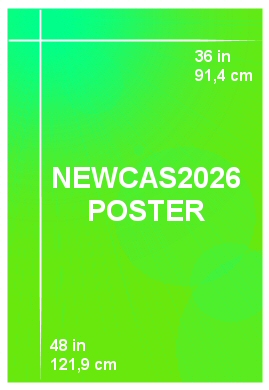
Print your paper number in the top right corner.
We will provide materials to hang your poster in the poster hall. Each poster board onsite will be marked with a number that directly correlates with each poster in the program. Please place your poster on the assigned board.
Please follow the following schedule for poster set-up and removal :
Monday, June 22nd
Session A3P-D
Set-up – 12:00 pm to 01:00 pm
Presentation – 2:30 pm to 3:30 pm
Removal – 03:30 pm to 04:00 pm
Wednesday, June 24th
Session C4P-C and C4P-D
Set-up – 12:00 pm to 1:00 pm
Presentation – 2:00 pm to 3:00 pm
Removal – 3:00 pm to 3:30 pm